Table of contents
Open Table of contents
编译准备
首先保证硬盘空间足够,本人一套流程下来文件夹有将近 60GB 大小。接下来是相关环境的安装,因为我的环境都是最新的,所以基本安装的都是最新版的包,如果你的环境不是新版的话,请找对应版本包安装。本人环境说明:
| 名称 | 版本 |
|---|---|
| 芯片 | Apple M2 Pro |
| macOS | Ventura 13.3 |
| Python | 3.11.2 |
| CMake | 3.26.3 |
| ninja | 1.11.1 |
| sccache | 0.4.1 |
| Xcode | 14.3 |
我们可以通过 homebrew 统一安装环境:
$ brew install cmake ninja sccache此文只介绍 Xcode 调试环境,如果想用 VS Code 调试的话,需要用 Ninja 编译,Ninja 的编译请移步官方文档。
项目拉取
首先我们在文稿中新建一个文件夹,然后 cd 到我们的目录:
$ mkdir ~/Documents/swift-project
$ cd ~/Documents/swift-project
然后找到你的 Xcode 所支持的 Swift 版本,因为本人的 Xcode 为 14.3 版本,所以直接下载 Swift 5.8 Release。查找 Xcode 对应的 Swift 的版本有两种方式:
-
去官网,查看 Xcode 的 Release Notes,在 Overview 中会有介绍。例如:Xcode 14.3 Release Notes
-
终端运行命令查看
xcrun swift -version。本地环境输出如下:
swift-driver version: 1.75.2 Apple Swift version 5.8 (swiftlang-5.8.0.124.2 clang-1403.0.22.11.100)
Target: arm64-apple-macosx13.0
我们在刚才新建的目录中执行如下命令拉取对应的 Swift 源码,并 cd 到源码目录:
$ git clone --branch swift-5.8-RELEASE git@github.com:apple/swift.git
$ cd swift
拉取源码后还须拉取依赖
$ utils/update-checkout --tag swift-5.8-RELEASE --clone顺便说一句,上述操作最好全程科学上网。
编译
一切准备完毕后我们将开始第一步编译,这里我们需要用到官方的脚本,在 utils 目录下的 build-script 脚本,以下是本人所使用的命令。
$ utils/build-script \
--release-debuginfo --debug-swift-stdlib \
--xcode --skip-ios --skip-watchos --skip-tvos \
--skip-early-swiftsyntax --swift-darwin-supported-archs="$(uname -m)"
编译命令的参数最好做一些简单了解,不要盲目复制粘贴,这里只展示苹果 M 系列芯片的
arm64架构编译命令,如果你是Intel环境请自行查阅官方文档。或执行utils/build-script --help命令查阅。
我们来简单的介绍一下这里众多的参数:
-
--release-debuginfo编译出带有RelWithDebInfo环境变量的工程,类似于Debug和Release模式,RelWithDebInfo会优化一部分,但同时保留调试信息。 -
--debug-swift-stdlib编译带有调试信息的Swift标准库,如果想调试Swift编译器,可以使用--debug-swift。 -
--xcode使用CMake的 Xcode 生成器,编译完成后会生成一个Swift.xcodeproj工程。 -
--skip-ios --skip-watchos --skip-tvos跳过相应平台,这里只编译macOS平台。 -
--swift-darwin-supported-archs="$(uname -m)"编译相关架构,$(uname -m)命令用于获取机器架构环境,例如本机获取的结果为arm64。
--skip-early-swiftsyntax这个命令我们留到后面错误修复的时候再说,这里先留个悬念。
接下来我们回车执行命令,这里需要等待一段时间,编译时间长短与机器性能有关。编译结束之后,我们会在目录 ~/Documents/swift-project 下得到一个 build 文件夹,里面就是我们 build 的产物。
Xcode-RelWithDebInfoAssert+stdlib-DebugAssert。目录结构如下图:
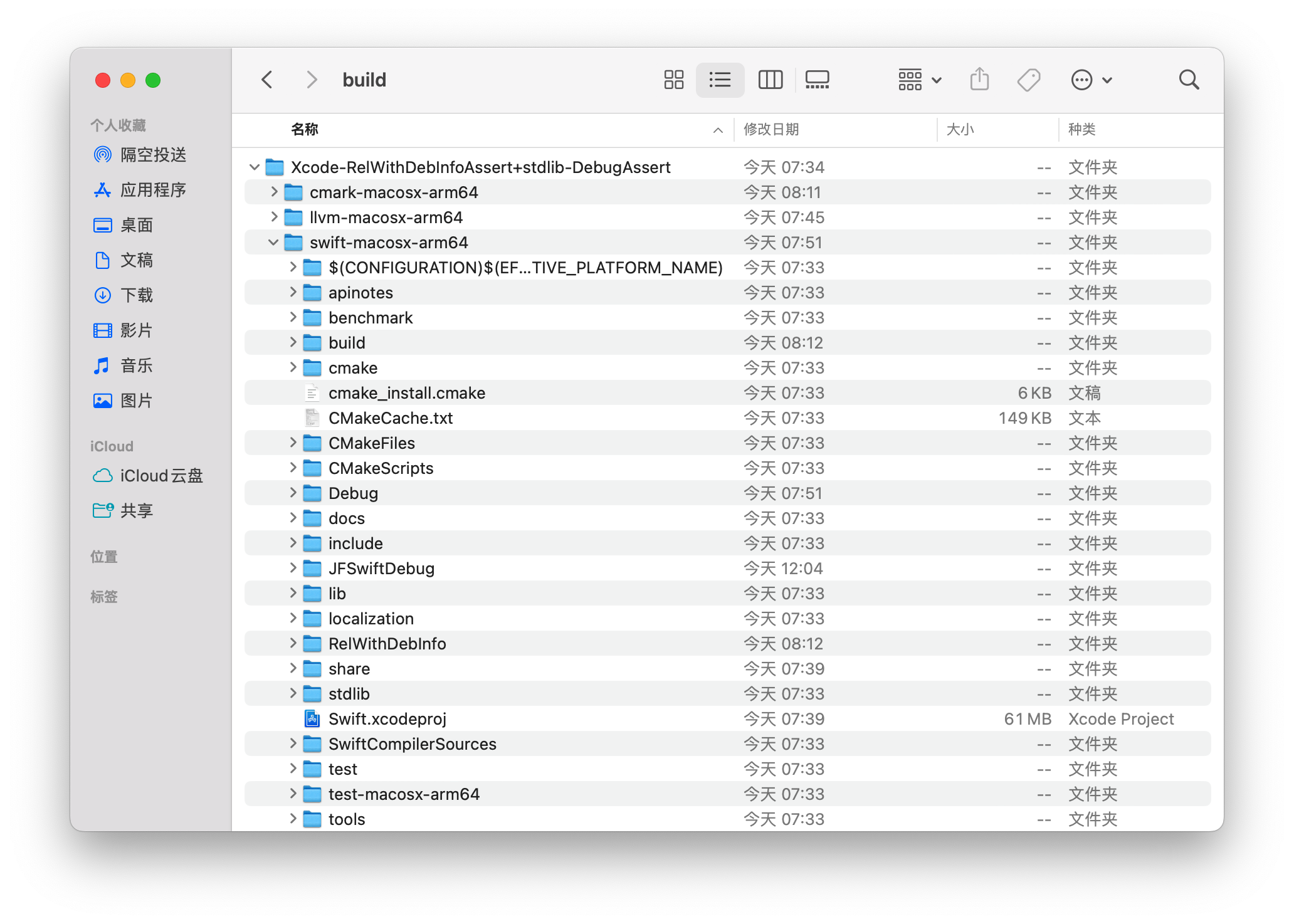
至此第一阶段编译完成,离成功又近了一步,接下来我们进入 Xcode 编译阶段。
源码调试
进入目录 swift-macosx-arm64 双击打开 Xcode 工程,此时会有自动创建 schemes 的提示,如下图,我们选择自动创建。
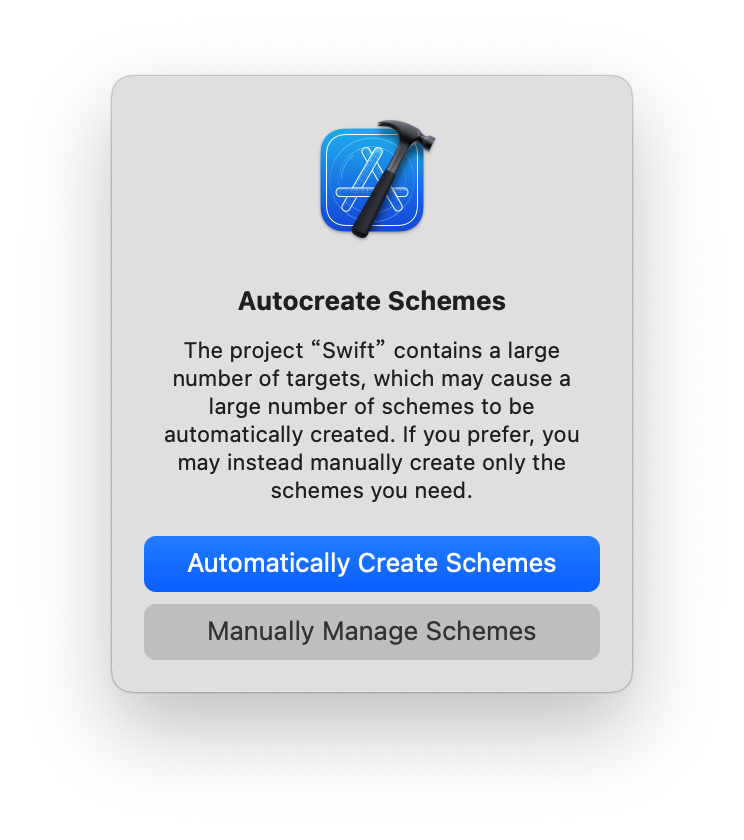
创建自定义 target 用于调试
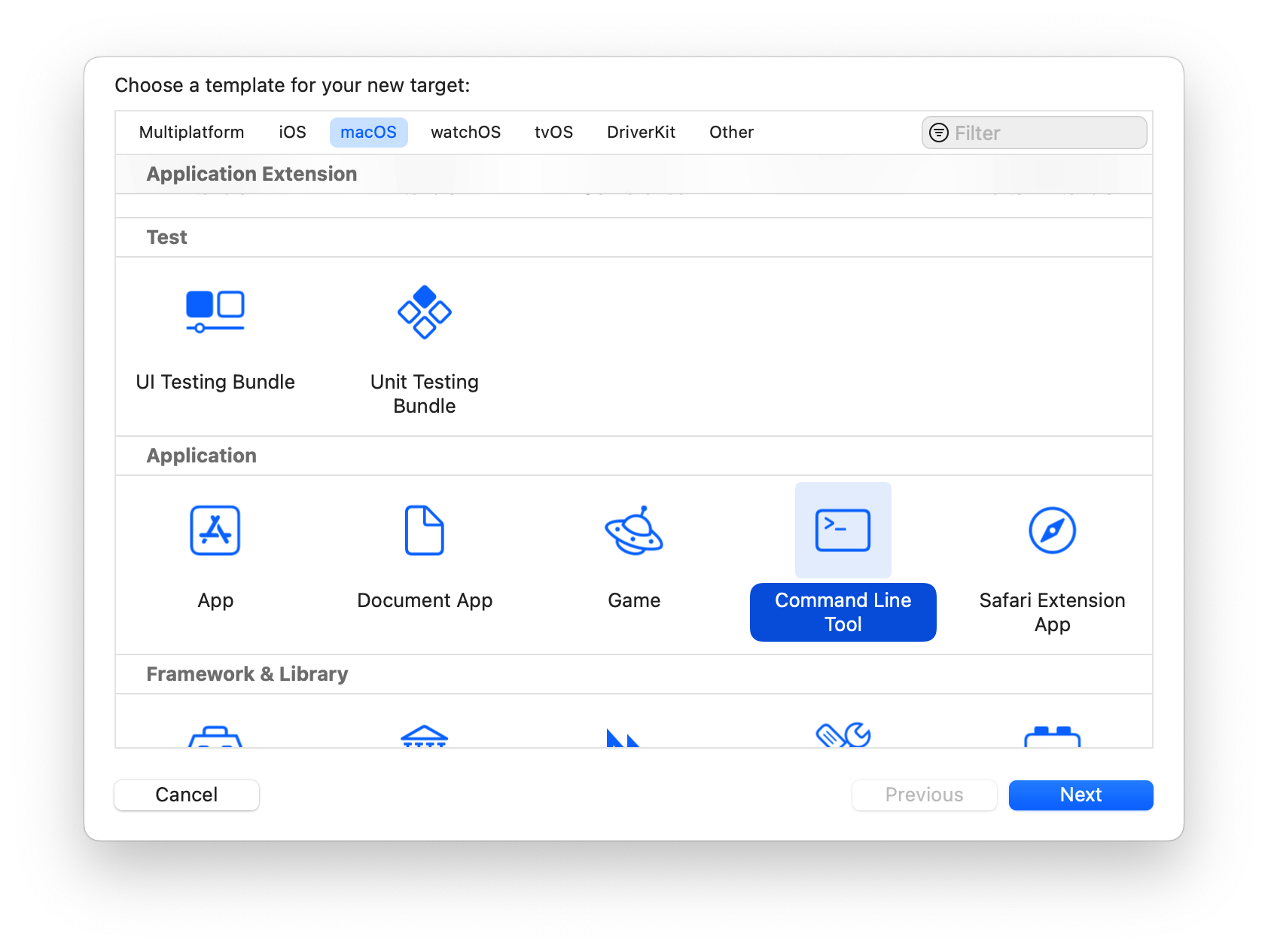
在 Swift.xcodeproj 工程里面,我们点击 TARGETS 下面的 + 新建一个调试的 target,我们选择 macOS 的命令行模式。如下图:
Product Name 取个自定义名字就行。接下来为我们的 target 引入依赖,如下图:
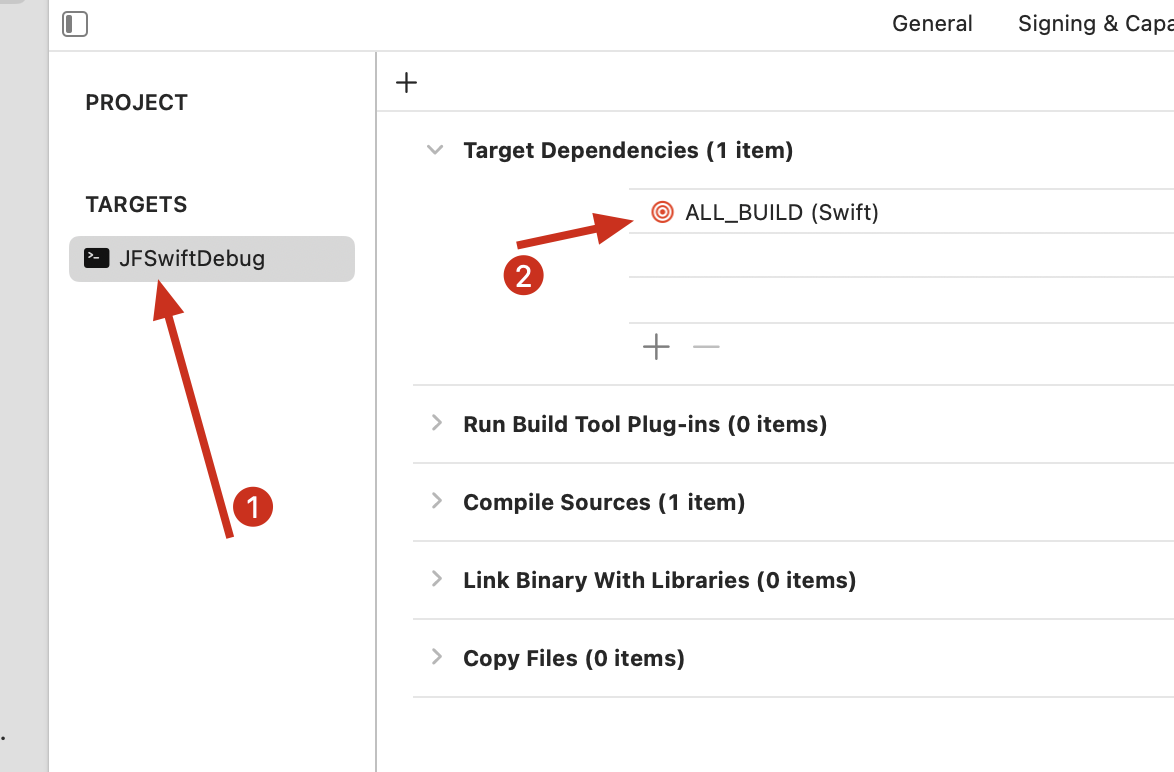
接下来我们需要在设置中关闭 Hardened Runtime 选项,如下图:
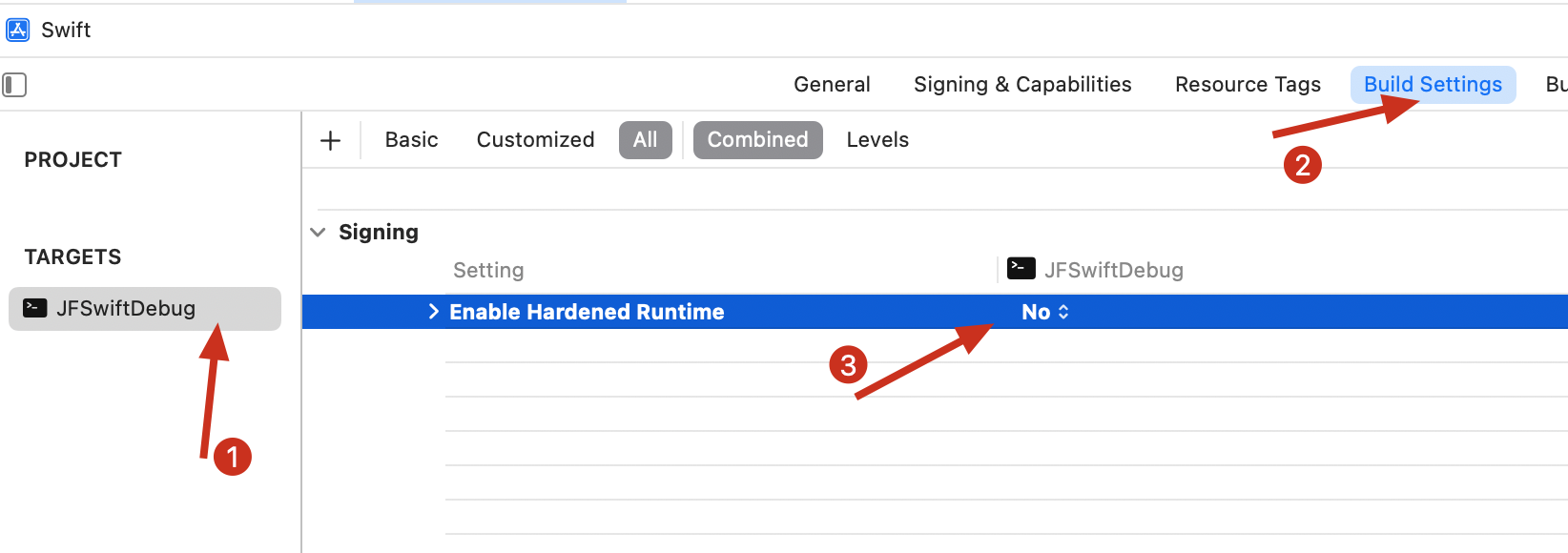
如果想了解更多关于 Hardened Runtime 的介绍,请查看官方文档:Hardened Runtime。
我们还须将 target scheme 的 Build Configuration 修改为 ReWithDebInfo。
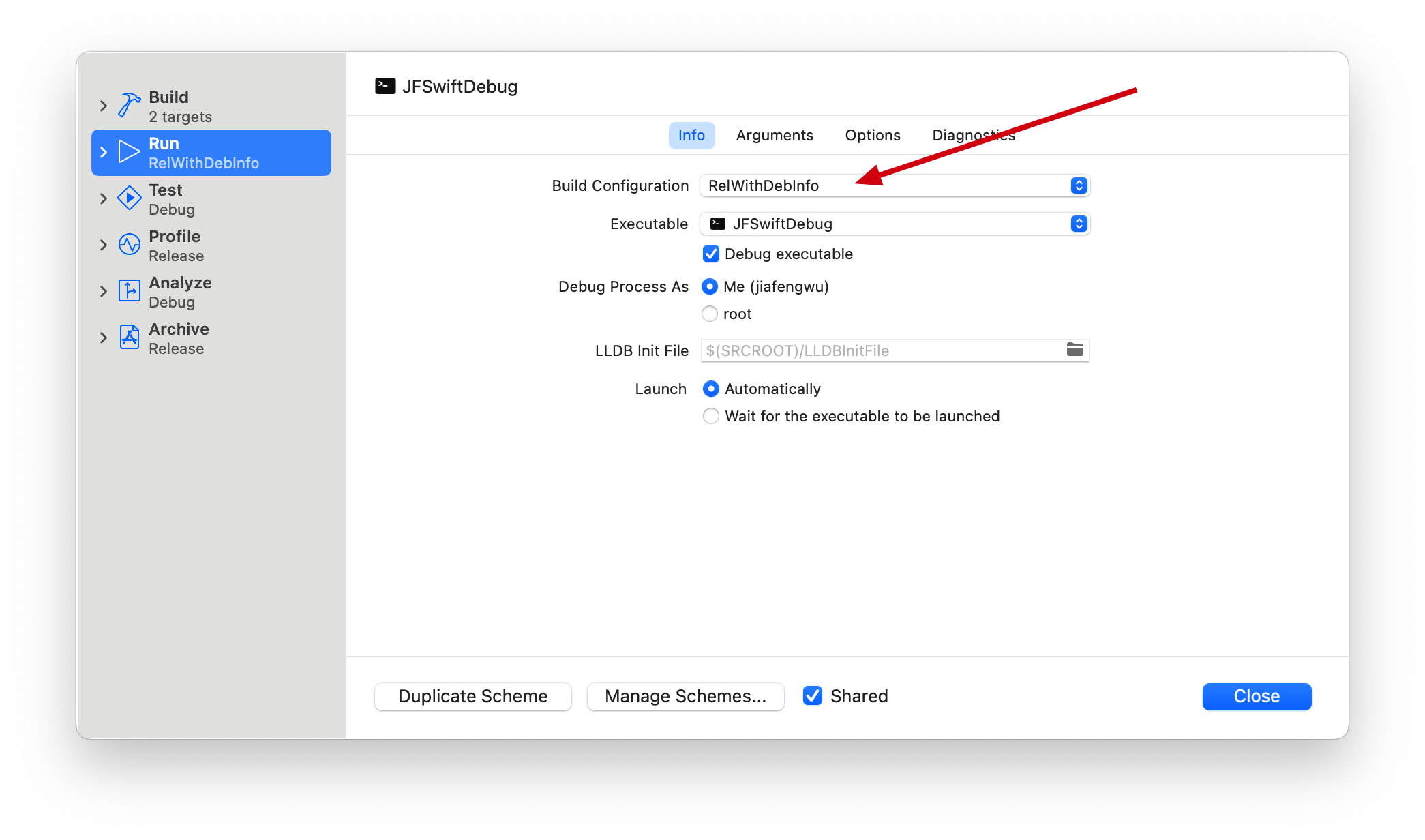
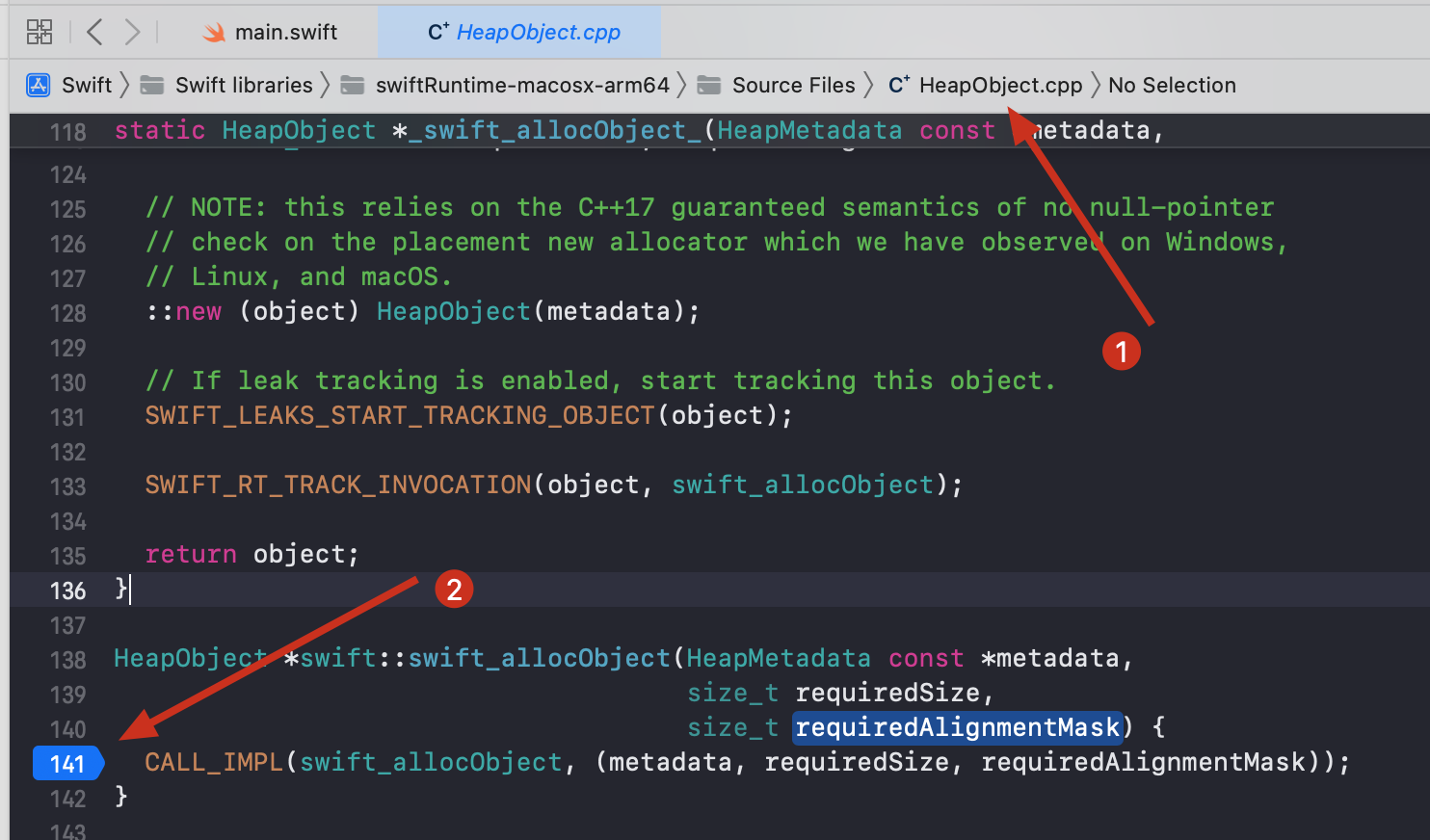
最后我们在自定义 target 文件夹下的 main.swift 文件中添加相应的代码,并在 HeapObject.cpp 中设置断点就可以开始愉快的调试了。如下图:
问题解决
在编译源码的过程中,本人遇到了几个问题,列在这里用以记录,也方便他人。
执行脚本阶段,最开始我执行的脚本并没有添加 --skip-early-swiftsyntax 这两个参数,脚本执行不通过,报错如下:
CMake Error in lib/ASTGen/CMakeLists.txt:
  Imported target "SwiftSyntax::SwiftBasicFormat" includes non-existent path

    "/Users/jiafengwu/Documents/github/buildSwiftSource/build/Xcode-RelWithDebInfoAssert+stdlib-DebugAssert/earlyswiftsyntax-macosx-arm64/lib/swift/host"

  in its INTERFACE_INCLUDE_DIRECTORIES.  Possible reasons include:

  * The path was deleted, renamed, or moved to another location.

  * An install or uninstall procedure did not complete successfully.

  * The installation package was faulty and references files it does not
    provide.


CMake Error in lib/ASTGen/CMakeLists.txt:
  Imported target "SwiftSyntax::SwiftBasicFormat" includes non-existent path

    "/Users/jiafengwu/Documents/github/buildSwiftSource/build/Xcode-RelWithDebInfoAssert+stdlib-DebugAssert/earlyswiftsyntax-macosx-arm64/lib/swift/host"

  in its INTERFACE_INCLUDE_DIRECTORIES.  Possible reasons include:

  * The path was deleted, renamed, or moved to another location.

  * An install or uninstall procedure did not complete successfully.

  * The installation package was faulty and references files it does not
    provide.


CMake Error in lib/ASTGen/CMakeLists.txt:
  Imported target "SwiftSyntax::SwiftBasicFormat" includes non-existent path

    "/Users/jiafengwu/Documents/github/buildSwiftSource/build/Xcode-RelWithDebInfoAssert+stdlib-DebugAssert/earlyswiftsyntax-macosx-arm64/lib/swift/host"

  in its INTERFACE_INCLUDE_DIRECTORIES.  Possible reasons include:

  * The path was deleted, renamed, or moved to another location.

  * An install or uninstall procedure did not complete successfully.

  * The installation package was faulty and references files it does not
    provide.


CMake Error in lib/ASTGen/CMakeLists.txt:
  Imported target "SwiftSyntax::SwiftBasicFormat" includes non-existent path

    "/Users/jiafengwu/Documents/github/buildSwiftSource/build/Xcode-RelWithDebInfoAssert+stdlib-DebugAssert/earlyswiftsyntax-macosx-arm64/lib/swift/host"

  in its INTERFACE_INCLUDE_DIRECTORIES.  Possible reasons include:

  * The path was deleted, renamed, or moved to another location.

  * An install or uninstall procedure did not complete successfully.

  * The installation package was faulty and references files it does not
    provide.


CMake Error in lib/Parse/CMakeLists.txt:
  Imported target "SwiftSyntax::SwiftBasicFormat" includes non-existent path

    "/Users/jiafengwu/Documents/github/buildSwiftSource/build/Xcode-RelWithDebInfoAssert+stdlib-DebugAssert/earlyswiftsyntax-macosx-arm64/lib/swift/host"

  in its INTERFACE_INCLUDE_DIRECTORIES.  Possible reasons include:

  * The path was deleted, renamed, or moved to another location.

  * An install or uninstall procedure did not complete successfully.

  * The installation package was faulty and references files it does not
    provide.


CMake Error in lib/Parse/CMakeLists.txt:
  Imported target "SwiftSyntax::SwiftBasicFormat" includes non-existent path

    "/Users/jiafengwu/Documents/github/buildSwiftSource/build/Xcode-RelWithDebInfoAssert+stdlib-DebugAssert/earlyswiftsyntax-macosx-arm64/lib/swift/host"

  in its INTERFACE_INCLUDE_DIRECTORIES.  Possible reasons include:

  * The path was deleted, renamed, or moved to another location.

  * An install or uninstall procedure did not complete successfully.

  * The installation package was faulty and references files it does not
    provide.


CMake Error in lib/Parse/CMakeLists.txt:
  Imported target "SwiftSyntax::SwiftBasicFormat" includes non-existent path

    "/Users/jiafengwu/Documents/github/buildSwiftSource/build/Xcode-RelWithDebInfoAssert+stdlib-DebugAssert/earlyswiftsyntax-macosx-arm64/lib/swift/host"

  in its INTERFACE_INCLUDE_DIRECTORIES.  Possible reasons include:

  * The path was deleted, renamed, or moved to another location.

  * An install or uninstall procedure did not complete successfully.

  * The installation package was faulty and references files it does not
    provide.


CMake Error in lib/Parse/CMakeLists.txt:
  Imported target "SwiftSyntax::SwiftBasicFormat" includes non-existent path

    "/Users/jiafengwu/Documents/github/buildSwiftSource/build/Xcode-RelWithDebInfoAssert+stdlib-DebugAssert/earlyswiftsyntax-macosx-arm64/lib/swift/host"

  in its INTERFACE_INCLUDE_DIRECTORIES.  Possible reasons include:

  * The path was deleted, renamed, or moved to another location.

  * An install or uninstall procedure did not complete successfully.

  * The installation package was faulty and references files it does not
    provide.
从上面的报错可看出,出错的原因是在编译 earlyswiftsyntax 的时候。要修复此问题,我们只需添加参数 --skip-early-swiftsyntax 即可,让其在执行编译命令的时候跳过 earlyswiftsyntax 的构建。因为这并不影响我们最终的源码调试。
Xcode 编译阶段,第一次执行编译的时候出现了如下的错误:
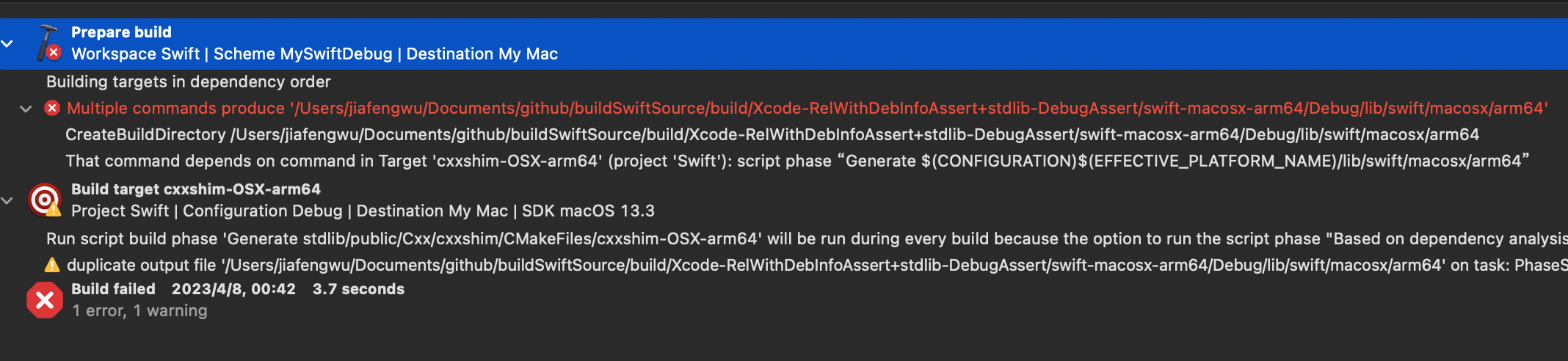
这是由于在执行 utils/build-script --xcode 的时候 cxxshim 试图创建模块目录导致。我们只需要将 swift/stdlib/public/Cxx/cxxshim/CMakeLists.txt 此文件中的如下命令删除即可:
list(APPEND outputs ${module_dir})
if(SWIFT_BUILD_STATIC_STDLIB)
  list(APPEND outputs ${module_dir_static})
endif()
然后清空 build 目录,重新执行 utils/build-script 进行构建即可。
接下来一切完成后,继续 Xcode 编译又会出现如下错误:
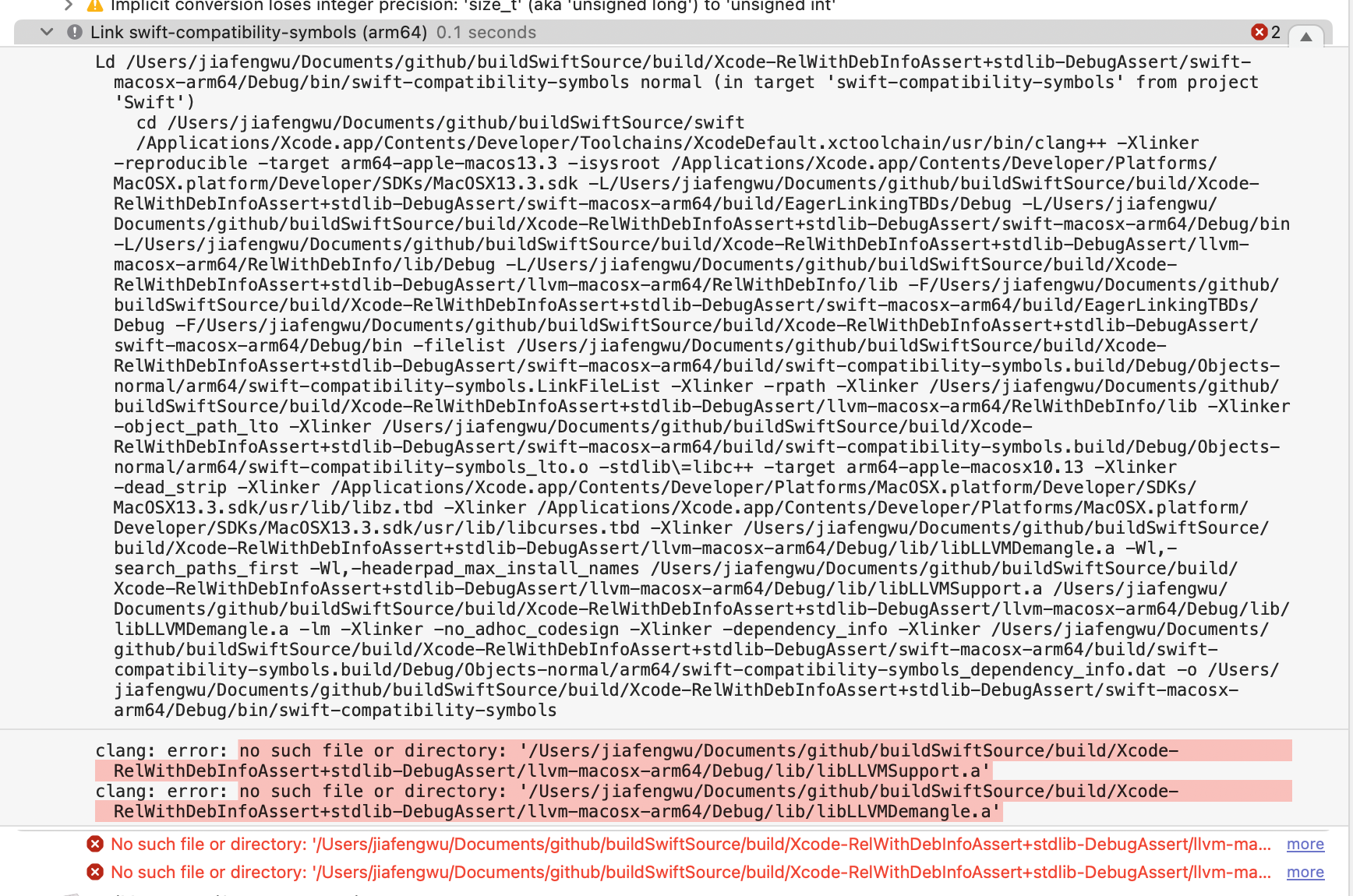
看报错是 llvm-macosx-arm64 中的 Debug 目录下没有相应的文件。首先我们查看 swift-compatibility-symbols 这个 target 将其 Build Configuration 修改为 ReWithDebInfo 。然后我们在执行编译即可。
参考文档
- How to Set Up an Edit-Build-Test-Debug Loop
- Bootstrapping broken for Ninja builds on Apple silicon Macs (arm64)
- Problems with
build-scriptbuilding compiler with–xcode - Fix multiple commands produce ${SWIFTLIB_DIR}/${arch_subdir}
- CMake error when running
build-scriptwith--xcode - Swift源码编译调试(M1/Xcode)
- 超实用~使用Xcode编译Swift源码